
The till system built for South African butcheries.
Made on the floor of a working abattoir butchery, and running at Northcliff Halaal Butchery today. Vendora sells through load shedding and network drops, sends your prices to your networked scales (Ishida, DIGI and other common brands), breaks a quarter into every cut, costs your boerewors, counts stock on a handheld and sends the books to Pastel, Sage, Xero or QuickBooks. It works for delis, shops and restaurants too.
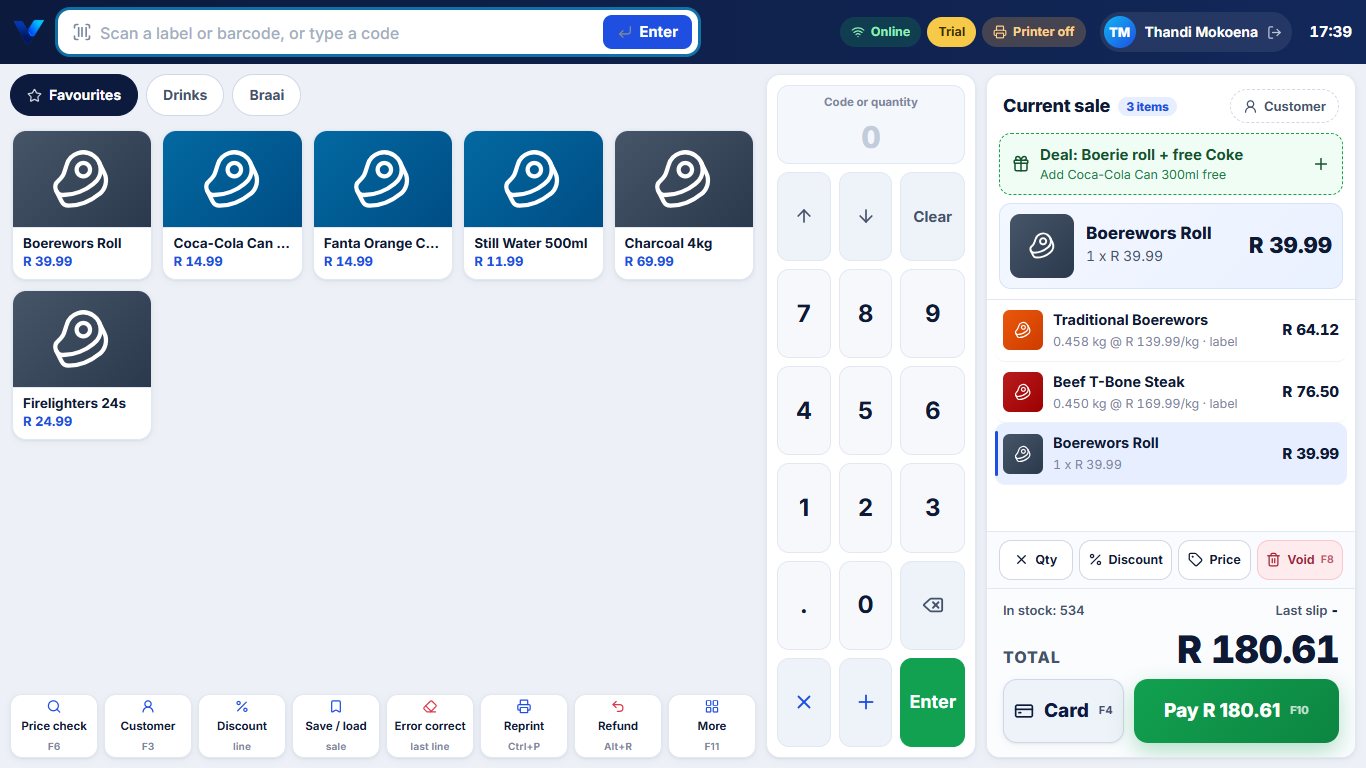
Everything Vendora does, in five minutes.
Northcliff Halaal Butchery runs on Vendora.
Two shops, Northcliff and Ormonde, run from one back office. They moved from their old till system to Vendora over one weekend in November 2026.
- Everything came across: over 1 000 products and prices, departments, suppliers, customer accounts with their balances, and two years of sales history.
- Their DIGI scales kept working: Vendora sends the prices, and the scale labels ring up on the till.
- Each shop has its own details on slips and invoices, with one shared price list.
Built for how South African butcheries really work.
Most till systems were made overseas for a supermarket with perfect internet. Vendora was built on the floor of a working abattoir butchery, to close the gaps local businesses live with every day.
What shops put up with
- Tills that stop when the internet or the server goes down
- Separate, expensive scale software to get prices onto the scales
- Typing in weights of meat that arrived with a label
- Breakdowns limited to a few cuts, recipes with no idea of cost
- Stock takes on paper, retyped into a PC
- Retyping the day's sales into the accounting package
- A separate system and waiters' notepads for the restaurant
What Vendora does instead
- Every till sells on its own and catches up when the network is back
- Works with your scales: prices and items sent to most common networked scales, including Ishida and DIGI, with label designs for Ishida
- Scan a label, get the weight, on the till and on the handheld
- Unlimited breakdowns and recipe costing with profit per kg
- Handheld stock takes and receiving in the browser, no app
- One-click exports to Pastel, Sage, Xero, QuickBooks or any CSV
- Restaurant mode: waiter tablets, kitchen screen and QR ordering
One till system. Every job in the shop.
Everything below is included. No add-ons to buy, no separate programs to keep in step.
Never stops selling
Each till keeps its own copy of products and prices. Network, internet or server down? It keeps selling, printing and opening the drawer, and sends everything later.
Works with your scales
Vendora connects to most common networked scales, and we add new models on request. Products and prices go straight to Ishida scales on the network, with no ScaleLink, and you design their labels in Vendora. DIGI scales get the same through DIGIConnect, which Vendora runs for you.
Specials and deals
Special prices with start and end dates, and deals like "buy a boerewors roll, get a Coke free". The till offers the deal to the cashier by itself.
Recipe costing
Boerewors, burgers, marinades: every ingredient with its cost, and Vendora shows the cost per kg, the profit and the GP% against your selling price.
Unlimited breakdowns
Quarters into primals, primals into cuts, as many levels as you need. Type the weight in and the cuts are worked out; the cost follows the meat.
Handheld stock takes
Count and receive stock on a handheld scanner in its browser. Several people count at once; loop and carton labels give the weight by themselves.
Restaurant mode
Waiters on tablets, a kitchen screen with timers, guests ordering from a QR code on the table and paying at the counter.
Accounting export
The day's sales, VAT, takings, account sales, receipts and supplier invoices, in the exact file Pastel, Sage, Xero or QuickBooks imports.
Multi-branch
Branches with their own stock, tills, staff and - if you want - their own prices, all in one back office.
Loss prevention
Voids, refunds, overrides, no-sales, typed weights and labels scanned twice, per cashier, with a weekly email to the manager.
Accounts and staff
Customer and staff accounts with limits, statements by email, age analysis, quotations, and rights per user with supervisor PINs.
Reports that add up
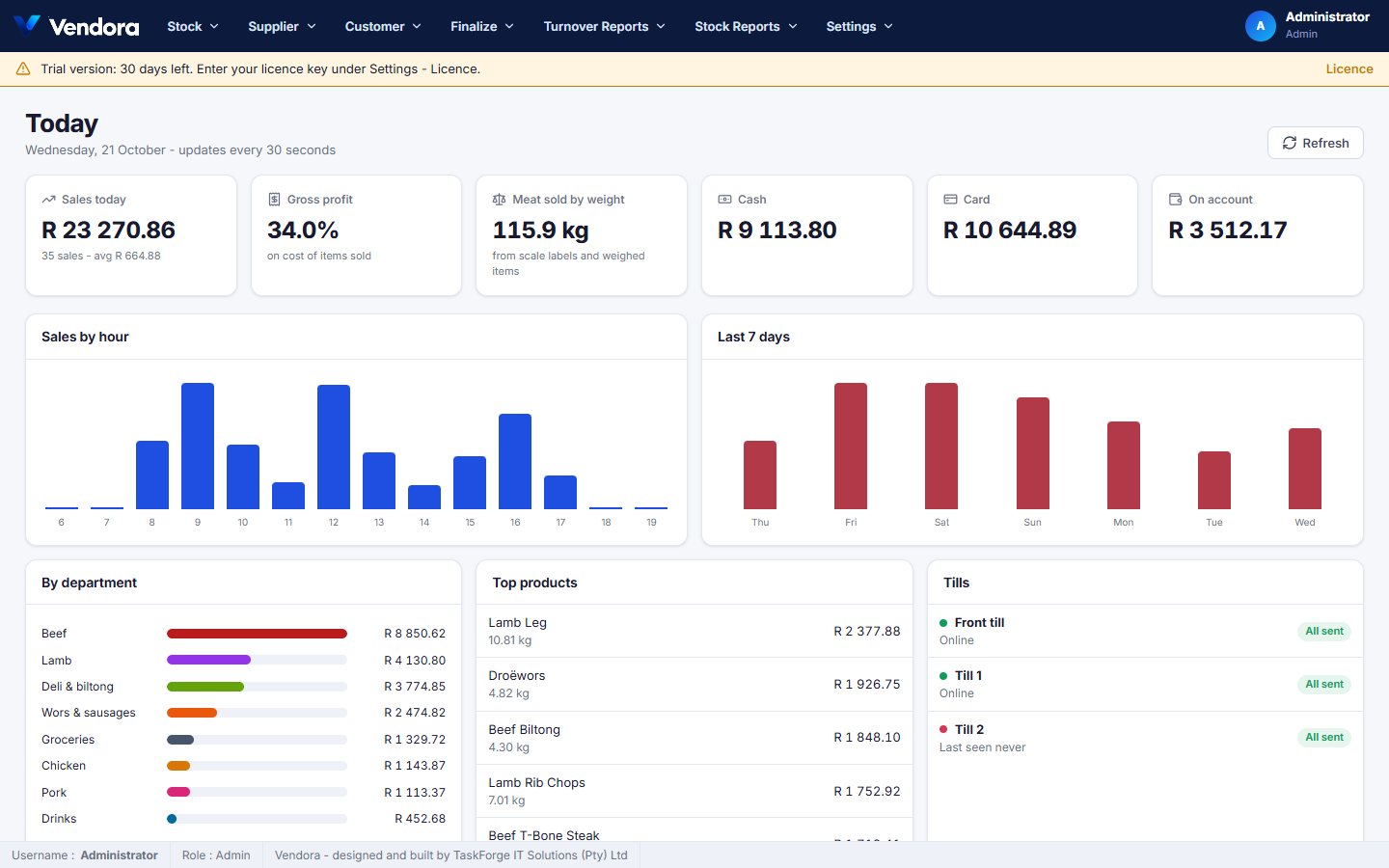
Live dashboard, end of day, cash-ups to the cent, gross profit by product and department, stock value and history.
From the carcass to the counter, costed.
Receive quarters with their weight, break them into cuts, make boerewors from a costed recipe and see exactly what each kilogram makes.
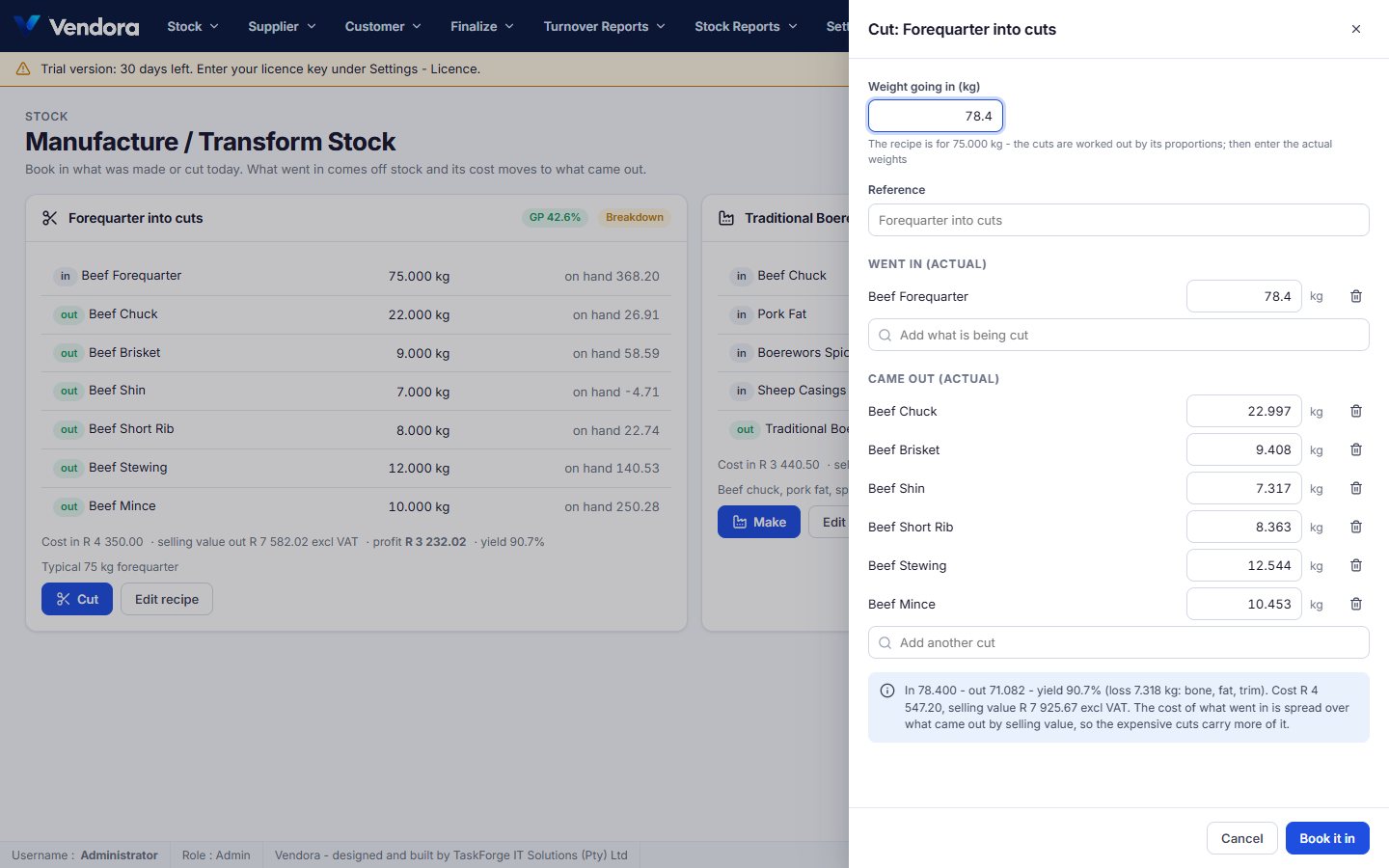
- Breakdowns without limits: forequarter into chuck, brisket, shin, short rib - then chuck into stewing and mince.
- Scale by weight: type 78.4 kg going in and every cut is worked out from your saved proportions.
- Cost follows the meat: the expensive cuts carry more of the cost, so your GP% is real.
- Recipes with profit: spices, casings and packaging included, cost per kg and GP% at a glance.
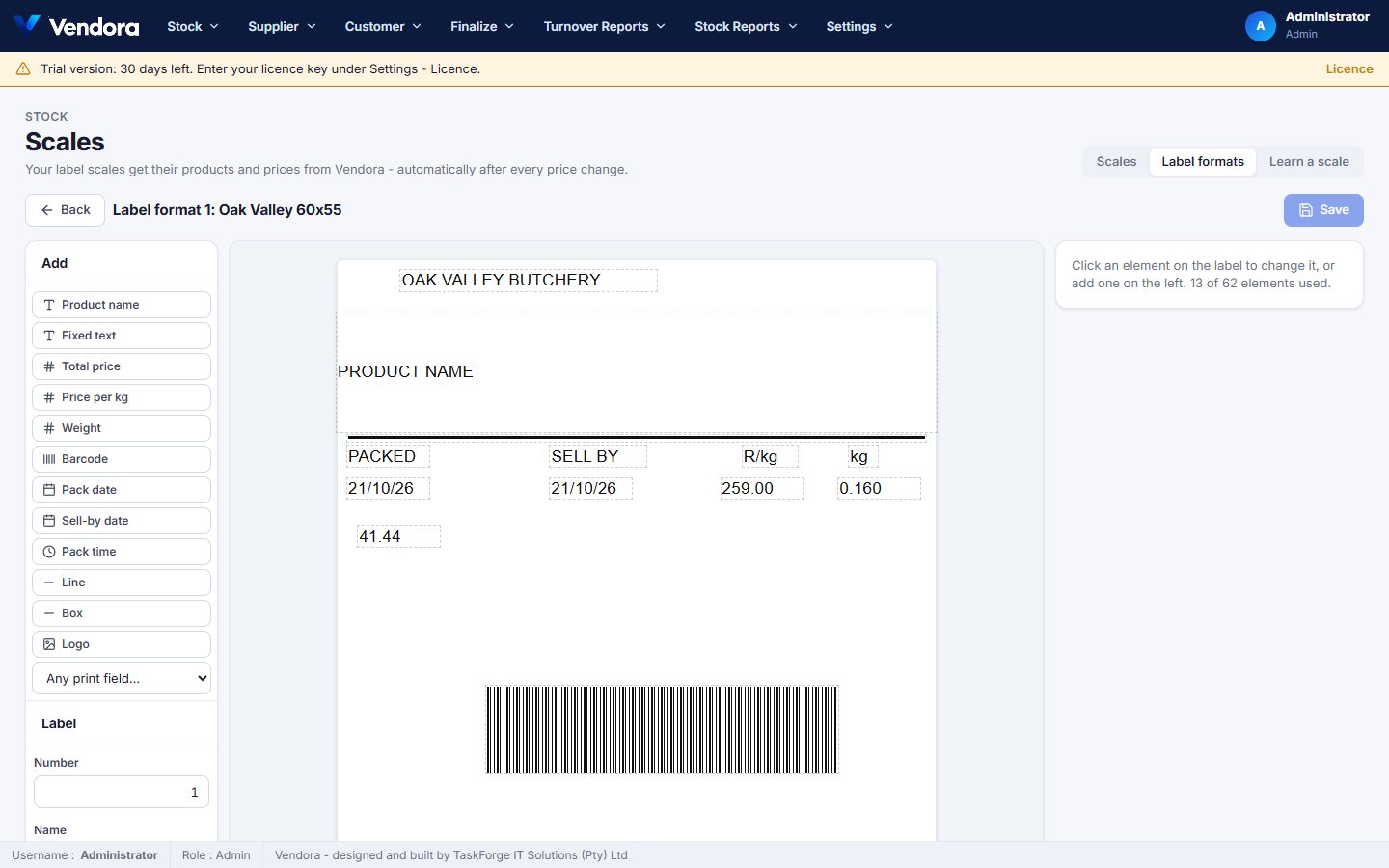
Your scales, run from Vendora.
Vendora works with most common networked scales, and if yours has a network connection we can add it. For example, it talks to Ishida Uni scales directly over the network, and keeps DIGI scales up to date through DIGIConnect. Change a price and the scales have it within minutes.
- Ishida: prices and items sent straight to every scale, with no separate scale software.
- DIGI: Vendora writes the price file and runs the DIGIConnect import on the shop PC, so nobody retypes prices on the scales.
- Label designer for Ishida: drag and drop the product name, price, barcode, dates and your logo; send it to the scale.
- Prices over R1 000 on the label barcode when you need them.
- Every label rings up correctly on the till, even labels printed before a price change.
Count stock on the cold room floor.
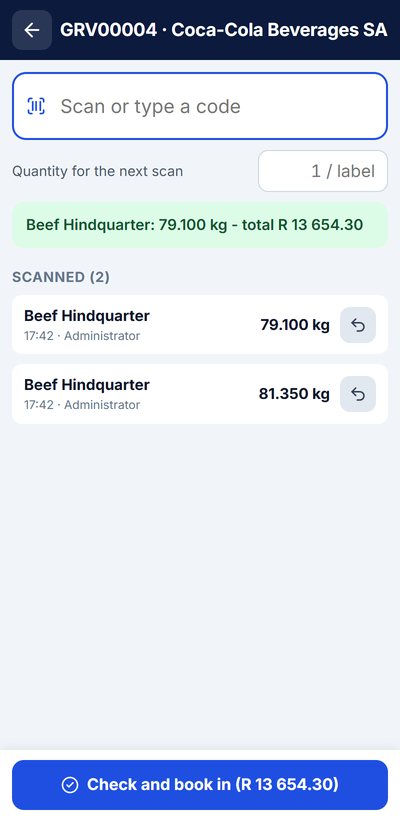
Open Vendora in the browser of any Android handheld scanner. No app to install, nothing to sync by cable.
- Stock takes with several people counting at once, undo on every scan.
- Receiving: scan the delivery in; GS1 carton and loop labels give the weight and batch.
- No double counting: the same weighed label can't go in twice.
- Book it in on the spot: stock, costs and the supplier's balance update.
No more notepads. No more lost orders.
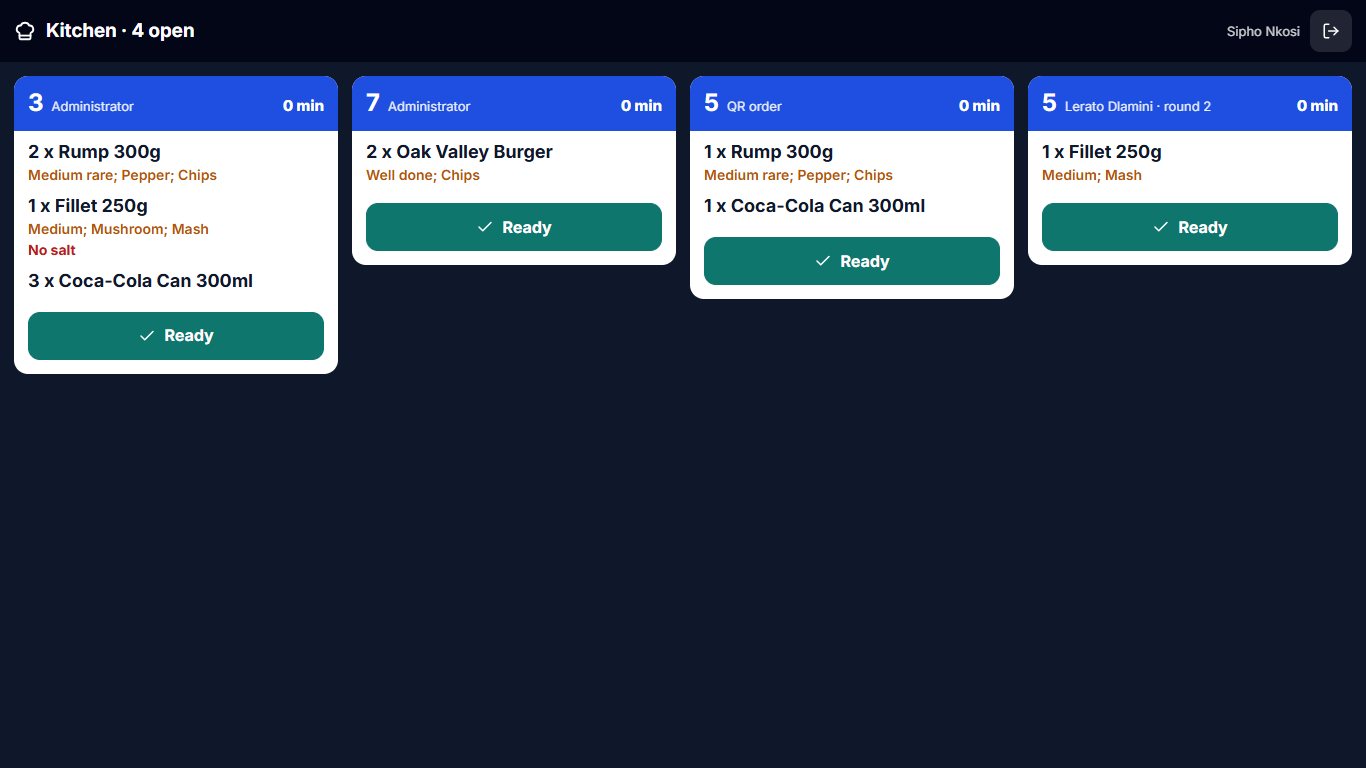
Switch Vendora to restaurant mode and the waiters, the kitchen and the guests work from one system.
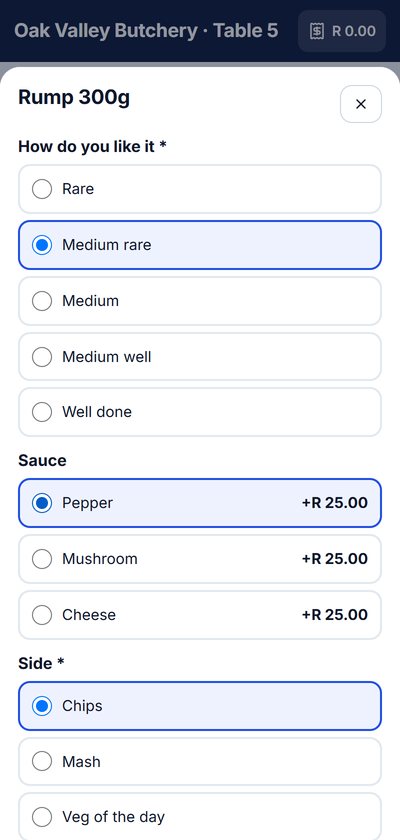
- Waiters on tablets: every table at a glance, orders with the options - how the steak is done, the sauce, the side.
- Kitchen screen: one ticket per table, oldest first, turning orange and red as it waits.
- QR code on every table: guests see the menu, order, follow their bill and ask for it. The first order is approved by a waiter, then it flows.
- Waiter report for tips, and the bill paid at the counter till.
The books, without retyping.
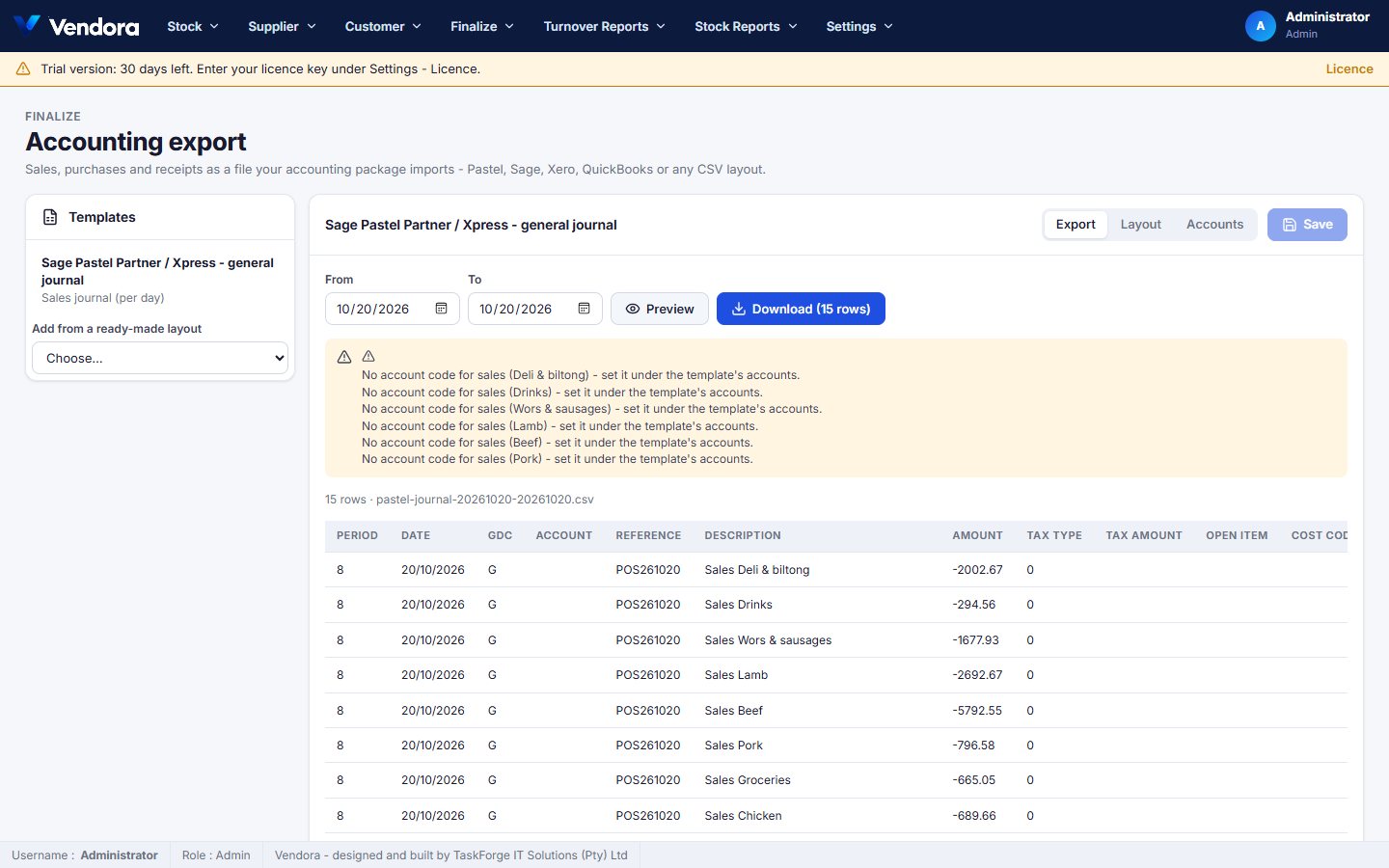
Choose your accounting package once, fill in your account codes, and export any period in seconds. No add-ons or links in the accounting package needed.
- Ready-made layouts for Sage Pastel, Sage Business Cloud, Sage Evolution, Xero and QuickBooks.
- Balanced journals: sales by department, VAT, rounding, cash, card, EFT and account sales.
- Invoices, receipts and supplier invoices too - or any CSV layout you design.
- Never twice: Vendora warns before a period is exported again.
Every branch, one back office.
Each till belongs to a branch. Stock, cash-ups and reports are kept per branch, and you see them together or one at a time.
Do your branches sell at the same prices?
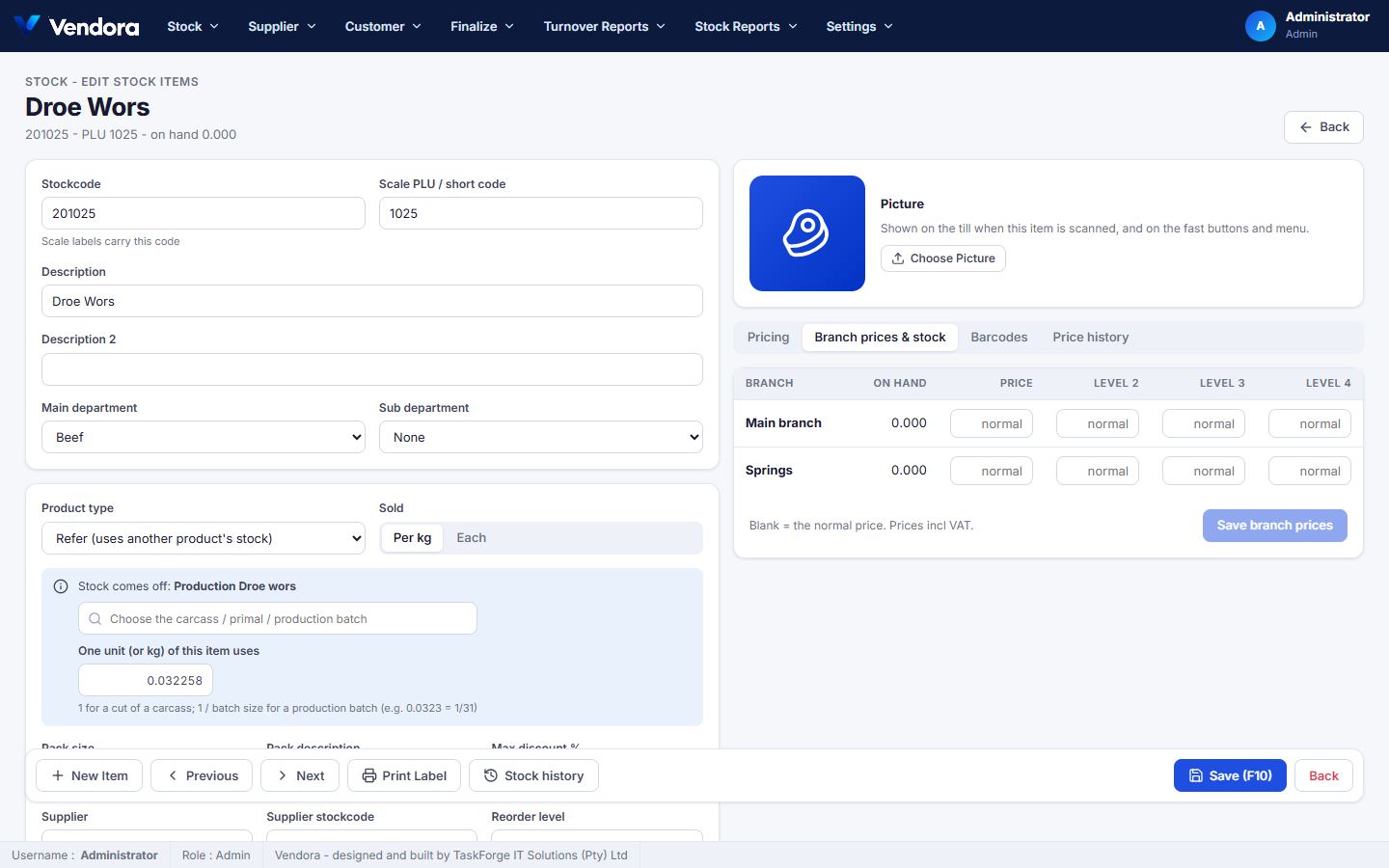
- Yes: one price list. Change a price once and every branch has it.
- No: each branch gets its own prices. A branch without its own price uses the normal one.
- Stock per branch, with transfers between branches when one runs short.
- Staff per branch, or managers who work at all of them.
You choose when you sign up and can change it later in the back office.
No server to buy. Or use your own.
Your back office lives at yourshop.taskforge-it.co.za, backed up and updated by us. Prefer your own server? Vendora runs on Windows or Linux, with SQLite or your own Microsoft SQL Server.
Nothing to install
No back office PC to buy, keep running or replace. Your data is on our servers in South Africa.
Backed up every night
Nightly backups with copies kept. If a till PC dies, a new one picks up where it left off.
Always up to date
We update the back office, and new till versions install themselves on your tills.
Secure
HTTPS, a login and PIN per person, locked after repeated wrong passwords, and every change logged.
Tell us about your shop. We work out the price.
Answer a few questions and see what you pay once-off and every month, hosted by us or on your own server. The full price list is below.
Set up once, then monthly.
A once-off setup for your shop, branches and tills, then a monthly fee per back office and per till. Everything on this page is included.
- First shop
Back office and the first till, set up for your shop.R5 980 - Extra branch setup
Each branch after the first, including its first till.R2 980 - Extra till setup
Each till after the first one at a shop.R480
Example: two branches with one till each = R8 960 once-off.
- No server to buy
- Includes the first till
- Backed up every night
- Updates and support
- Open it from anywhere
- Updates and support
- Includes the first till
- Your own server: SQLite or SQL Server
Selling in a day.
Sign up online and your back office is ready in minutes. We help with the rest.
Sign up
Choose your address, name your branches and say whether they share prices. Pay with PayFast.
Back office ready
Within minutes you get an email with your address and login.
Install the tills
One installer, Vendora Setup: add each till in the back office, run the setup on the till PC and it is linked.
Start selling
We import your products, prices and accounts from your old system, connect the scales and train your staff - with a full manual and training videos.
Good to know.
What happens when the internet or power goes down?
The tills keep selling, printing slips and opening the drawer (on a UPS during load shedding). Sales wait on the till and go to the back office by themselves when the connection is back.
Which scales does Vendora work with?
Most common networked scales, including Ishida and DIGI. If your scale has a network connection, we can usually add it: tell us the make and model and we will confirm before you sign.
Do I still need ScaleLink or other scale software?
Not for Ishida: Vendora sends products, prices and label designs straight to Ishida Uni scales on your network. DIGI scales keep using DIGIConnect, and Vendora feeds it the prices for you. Other makes can take a price file from Vendora.
Does it work for a restaurant?
Yes. Switch on restaurant mode: tables with QR codes, waiters on tablets or phones, a kitchen screen, and the bill paid at the counter till. Guests can order and see their bill from their phone.
Which accounting packages does it export to?
Sage Pastel Partner and Xpress, Sage Business Cloud, Sage Evolution, Xero and QuickBooks Online, plus any CSV layout you design. No link or add-on is needed in the accounting package.
Can I run it on my own server instead?
Yes. Vendora runs on your own Windows or Linux server, with SQLite or your own Microsoft SQL Server, and can move between them with all the data. The monthly fee is the own-server price above.
What hardware do I need?
A Windows 10 or 11 PC or touch screen per till, and in most cases the slip printer, cash drawer, scanner and scale you use today. Any Android handheld scanner with a browser works for stock takes.
Can you move us off our old till system?
Yes. We import products, prices, departments, suppliers, customer accounts with their balances and users from your current system, and can bring your sales history over too. We check the results with you. Northcliff Halaal Butchery moved over one weekend.
What happens if a payment is missed?
You get an email and a notice on the back office and the tills, with the date Vendora will lock. Pay before then and nothing changes. Sales already made are always kept.
Is my data mine?
Yes. Export products, sales and reports to Excel any time. If you leave, we give you a full copy of your database.
Can I cancel?
Monthly services have no contract. Email support@taskforge-it.co.za and the service stops at the end of the month you have paid for.
See Vendora on your own counter.
Book a demo and we bring it to your shop, or sign up online today.