
Know who is at work. Pay exactly what they worked.
Your face and fingerprint clocks feed straight into Attendio. It works out regular time, overtime, Saturdays, Sundays and public holidays by your rules, shows you who is late or missing before the morning is out, and hands payroll a file it already knows how to read. No more Monday mornings spent fixing clock cards.
Time and attendance should not be the hardest part of payroll.
Most time and attendance programs in South African workplaces were written twenty years ago for a single PC in the office. Attendio was built on the floor of a working abattoir and farm, to fix what the people who run payroll deal with every week.
What payroll puts up with
- One old PC in the office that has to stay on for the clocks to download
- Finding out on payday that someone never clocked out last Tuesday
- Sunday, Saturday and public holiday rates worked out by hand
- Rosters copied week by week, one person at a time
- Clockings changed with no record of who changed them or why
- Two companies, two HR people, and everybody seeing everything
- Screens that look like 1998 and need a technician for every change
What Attendio does instead
- Runs in the browser on any PC, tablet or phone - nothing to install
- Flags it the same day: late, absent, missing clock-out, left early
- Your rules, worked out for you: grace, rounding, lunch, overtime and every day's rate
- Drag a shift across the roster, or repeat a pattern for months in one click
- Every change kept with who made it, when and the reason they gave
- Companies kept apart: each HR person sees only their own people
- Clear, modern screens that new staff understand in minutes
Built on a real payroll, checked to the minute.
Before a single screen was drawn, Attendio was run against a year of real clockings from a South African abattoir and farm and checked against the payroll the old system had produced.
clockings brought across from the old system in about a minute
late, absent and missing clockings flagged the day they happen, not on payday
to work out a full pay period for 300 people
clockings lost: corrections are kept, never overwritten
Every morning, sorted before tea time.
Open Attendio and the day is already worked out. Here is what payroll, HR and supervisors see.
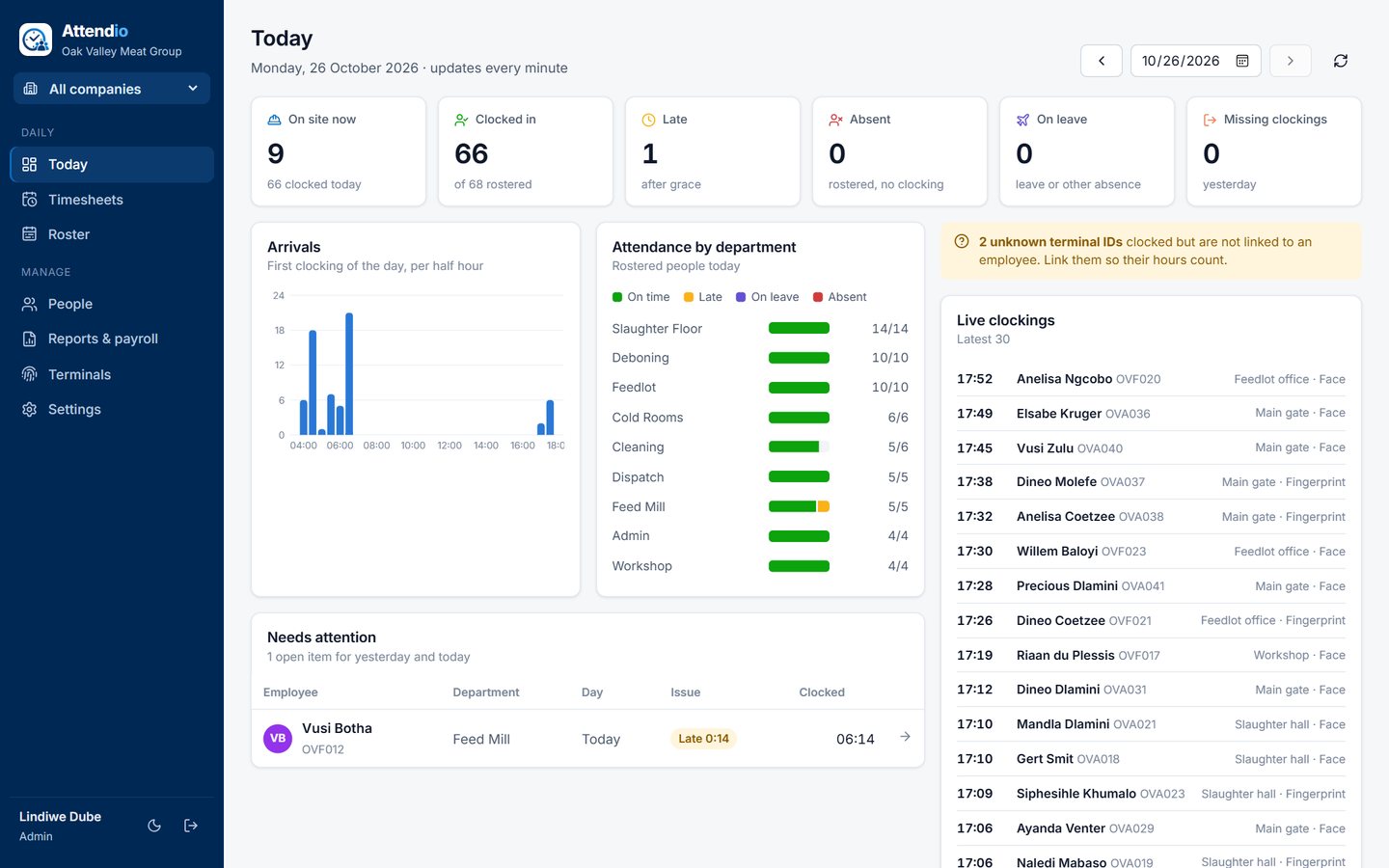
Who is here, who is late, who is missing.
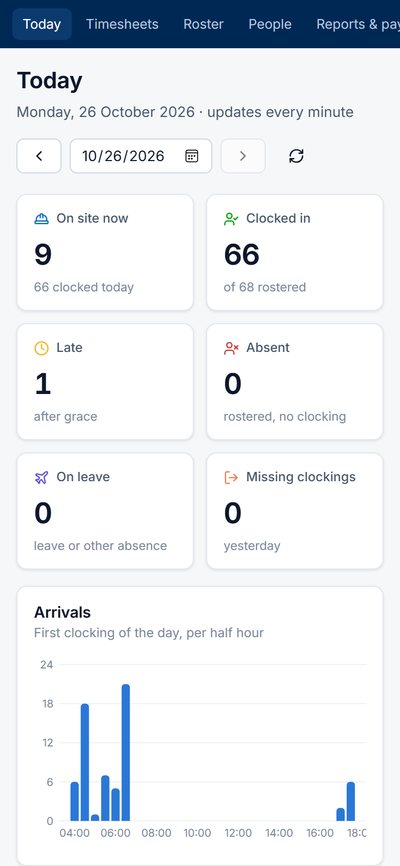
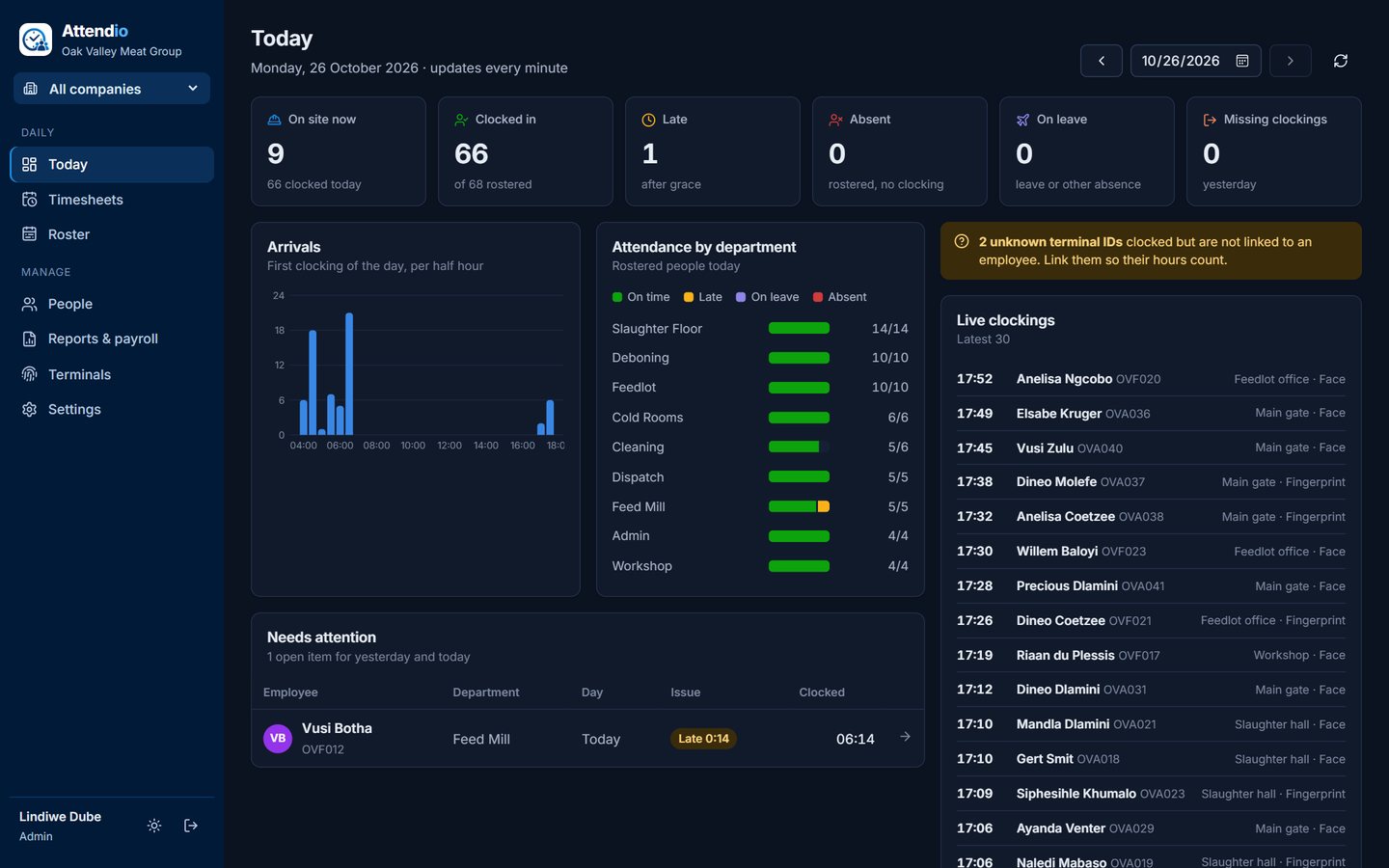
The Today screen updates by itself every minute from the clocks at the gates and in the buildings.
- On site now, clocked in, late, absent and on leave at a glance.
- Arrivals per half hour and attendance for every department.
- Needs attention: yesterday's missing clock-outs and today's late arrivals, one click from the timesheet.
- Live clockings with the terminal and whether it was a face or a fingerprint.
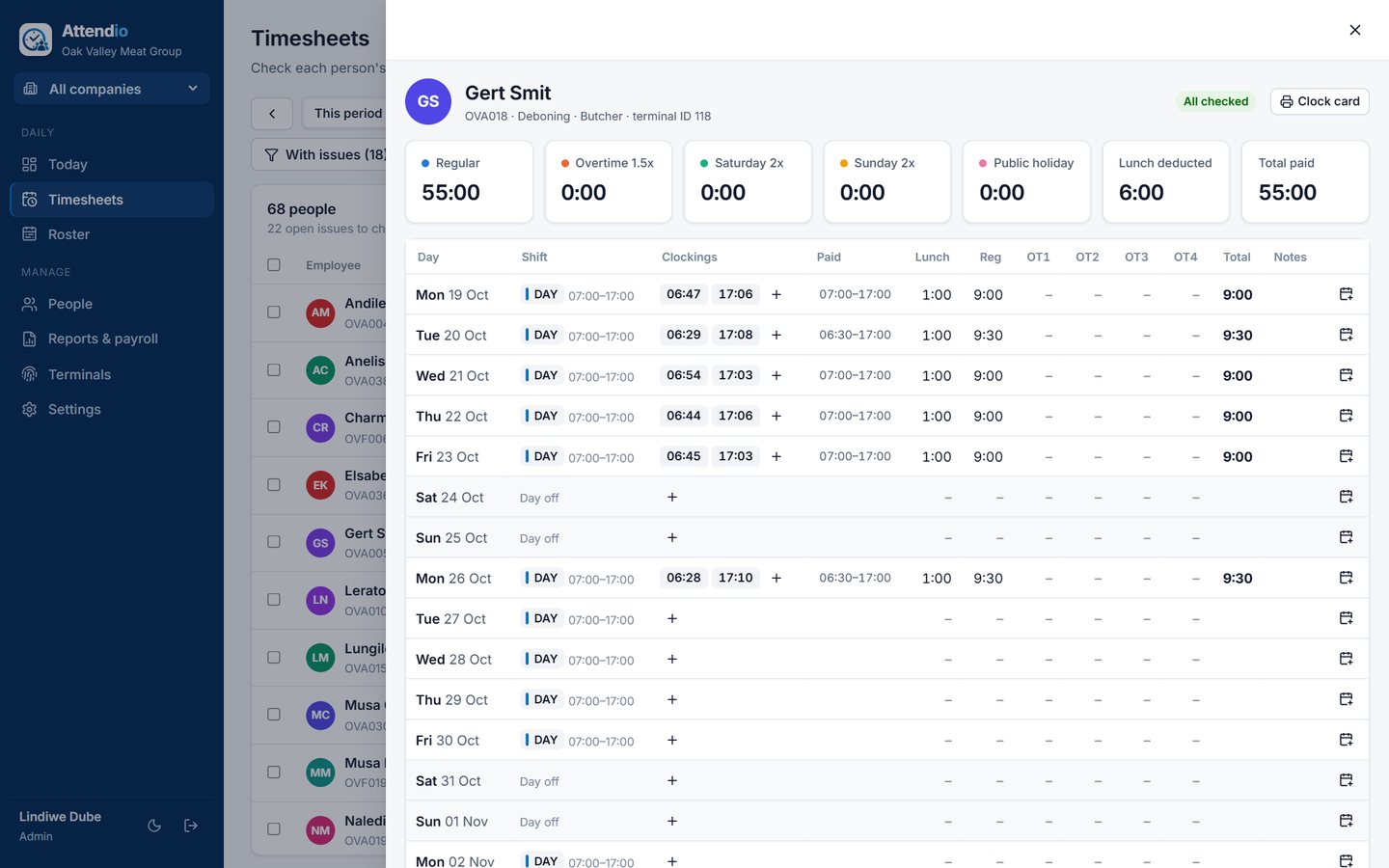
A whole pay period, checked in one sitting.
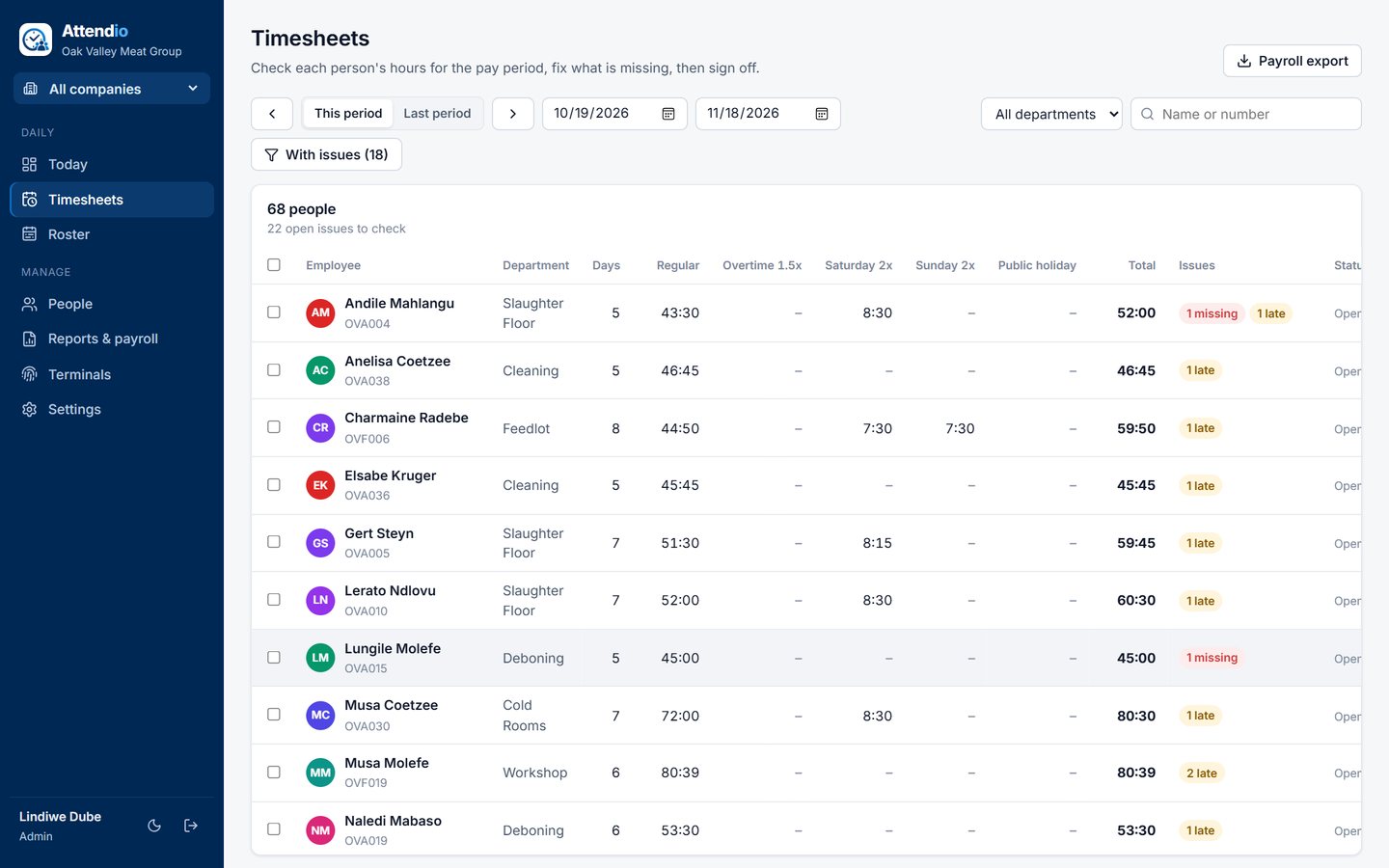
Each person's hours for the pay period, already split into regular time, overtime, Saturdays, Sundays and public holidays. Open anyone to see every day.
- Issues first: people with absent days, missing clockings or late arrivals sort to the top.
- Fix it on the spot: add, move or remove a clocking, add leave, or mark a day as checked.
- A reason for every change, kept with the clocking and in the change history.
- Sign off the period per person; signed-off timesheets are locked.
Changes everybody can trust.
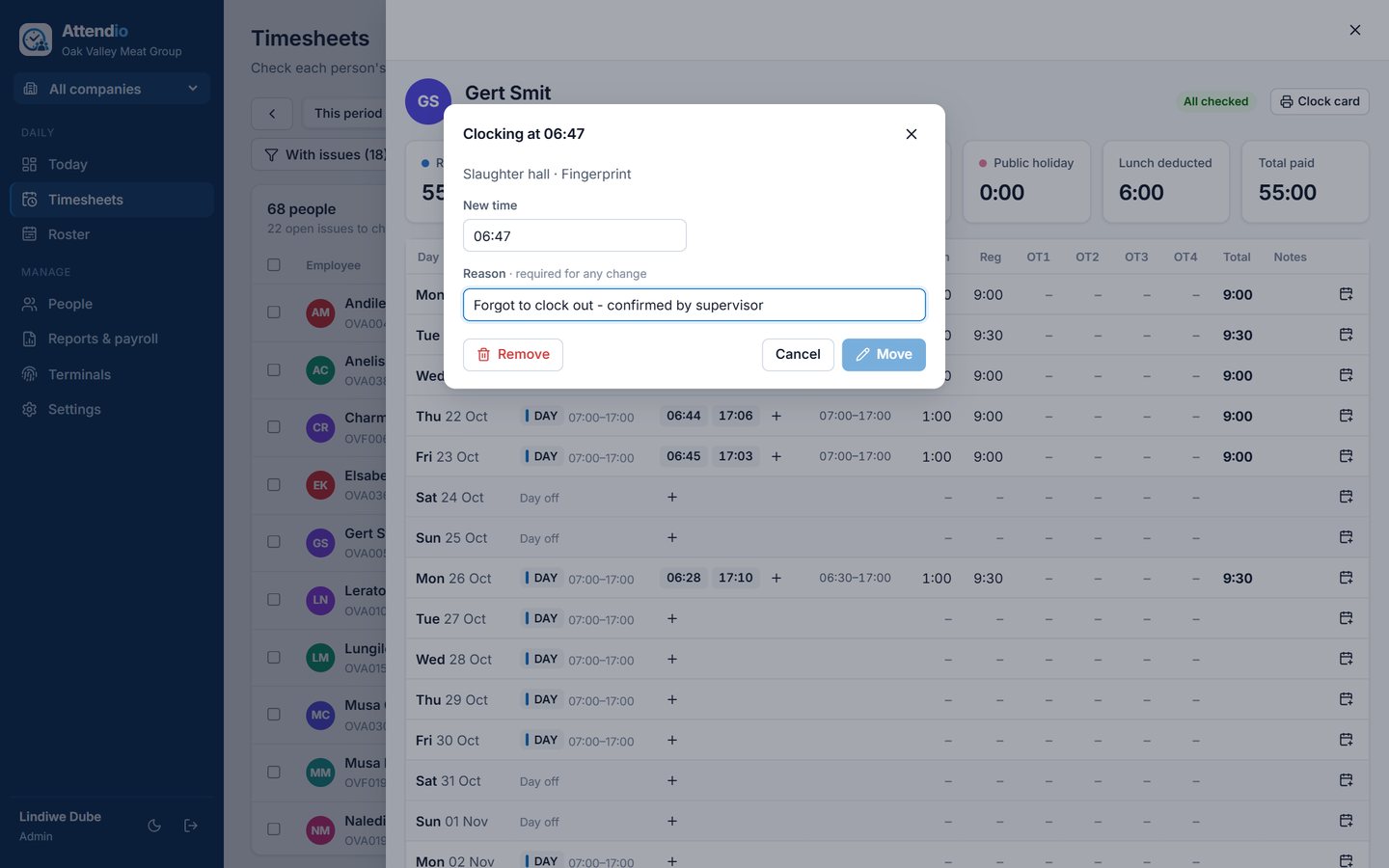
Forgot to clock out? The supervisor adds the clocking with a reason. Clocked twice? Move or remove it. Nothing is ever deleted for good.
- Who, when and why on every change, shown on the timesheet and in the change log.
- Removed clockings stay visible and can be restored.
- Original times kept when a clocking is moved.
- Supervisors only reach their own departments; payroll signs off.
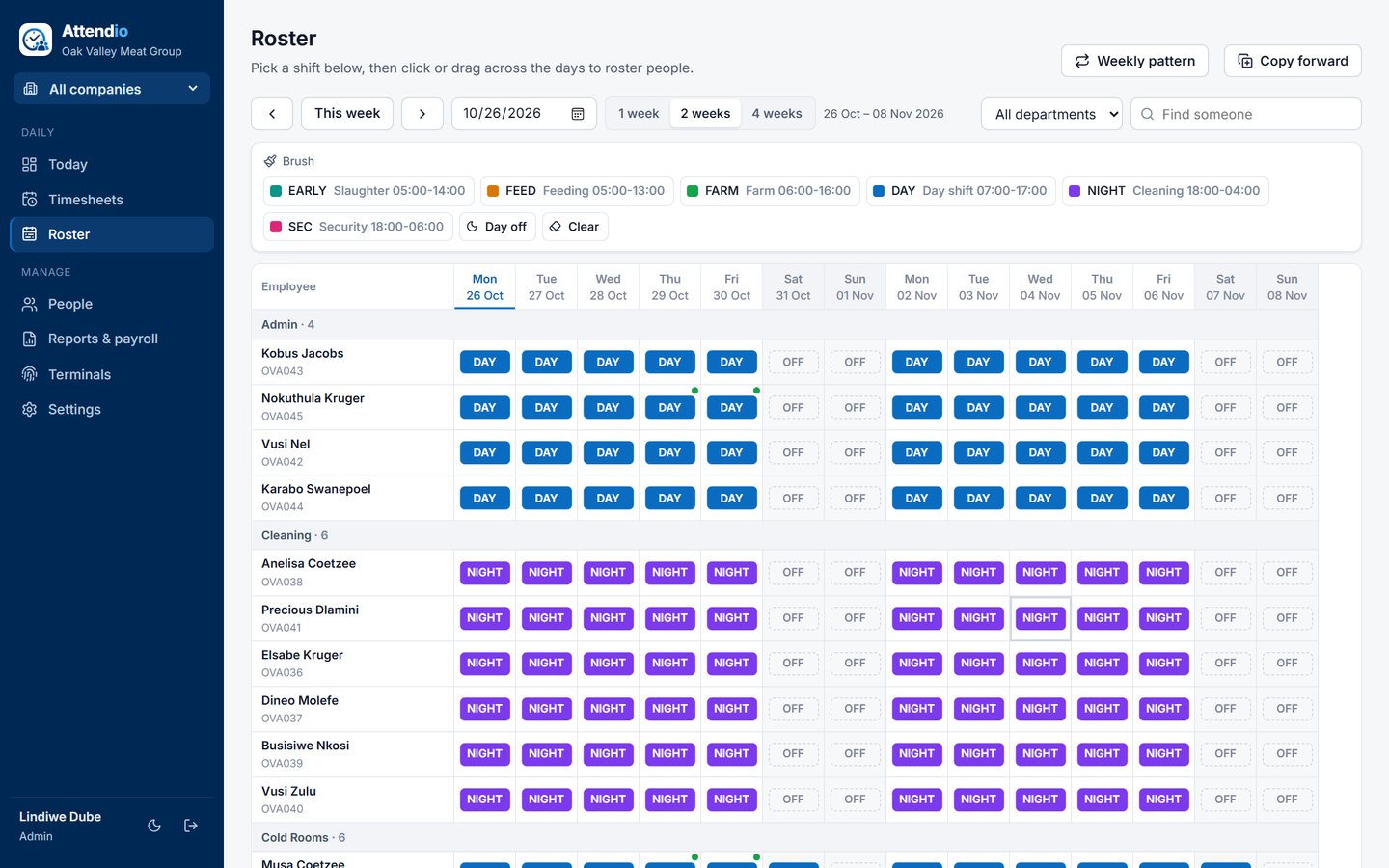
Roster a month in a minute.
Pick a shift and drag it across the days. Set a weekly pattern for a whole department, or copy a rotating schedule forward for a year.
- Drag and drop shifts, days off and clearing, for many people at once.
- Weekly patterns - day shift Monday to Friday, every second Saturday - applied in one go.
- Copy forward two or four weeks as many times as you like; rotations keep their rotation.
- Leave and public holidays shown right on the roster.
One system for the whole clock-in to payslip journey.
Everything below comes with Attendio. No modules to buy, no separate program for the clocks.
Biometric terminals
ZKTeco face and fingerprint clocks downloaded automatically every few minutes, or sending their clockings themselves from other sites.
Your pay rules
Grace and docking for late arrivals, rounding, early and late overtime, lunch deducted after so many hours, and the rate for every day of the week.
Overtime limits
Regular time per day, week or pay period; everything over it becomes overtime by itself.
Public holidays
South African holidays added for you, including the Monday after a Sunday holiday. Paid when not worked, at the holiday rate when worked.
Night shifts
Shifts that cross midnight belong to the day they started, so a 18:00 to 04:00 shift is one shift on one timesheet.
Exceptions
Absent, late, left early, missing clock-in or clock-out, not rostered, overtime not approved - flagged the same day.
Leave
Annual, sick, family responsibility and your own types, for one day or a range, skipping weekends and holidays.
Sign-off
Payroll signs off each person's period; signed-off timesheets can't be changed until the sign-off is undone.
Payroll exports
Totals per pay column in the layout your payroll already imports, or a clean spreadsheet in decimal hours.
Clock cards
Printable clock cards for every person with signature lines, plus absent, late and hours reports.
Users and rights
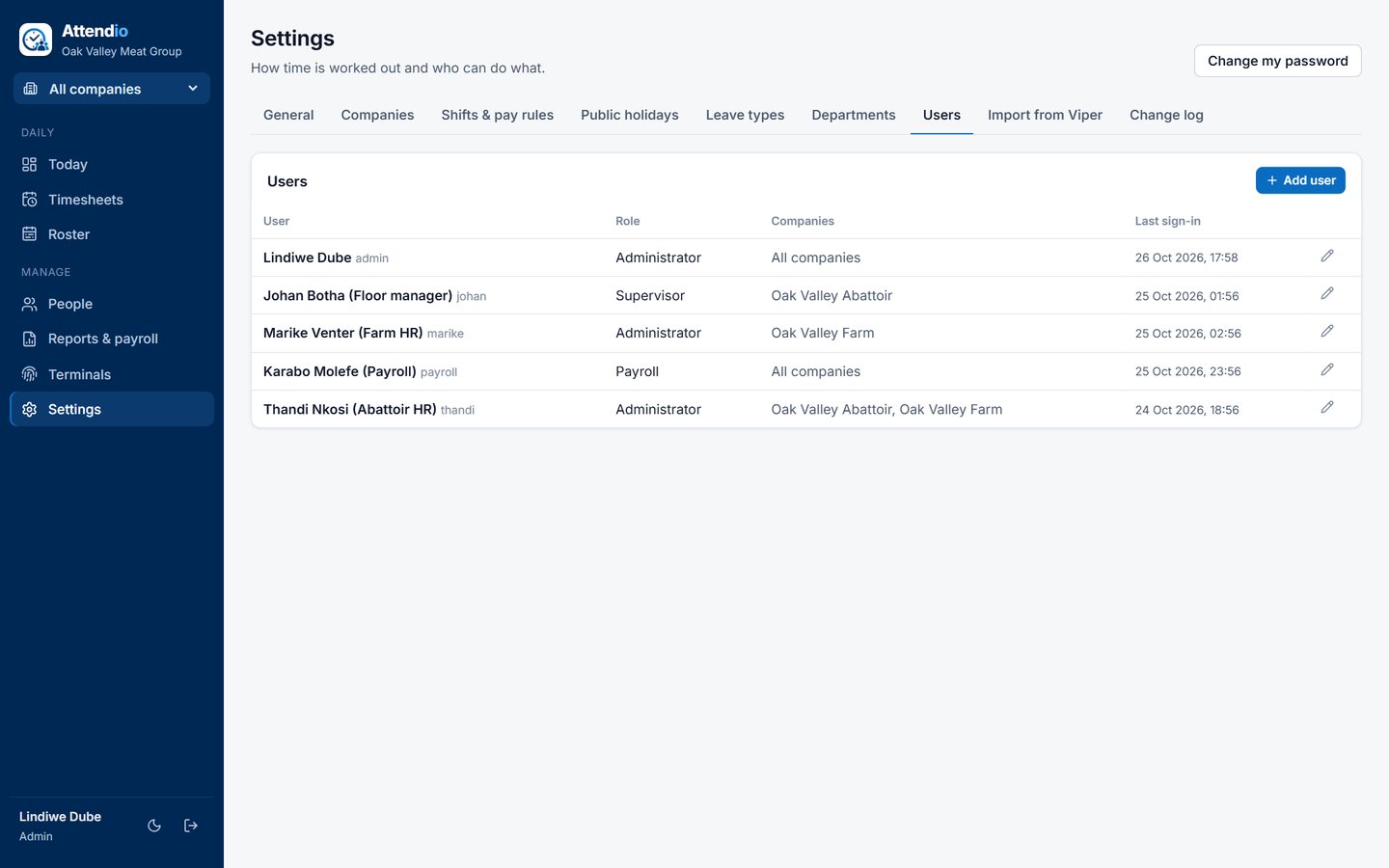
Viewers, supervisors per department, payroll and administrators; every change logged.
Several companies
Keep companies and sites apart, each with its own people, clocks and pay period.
The clocks you already have, finally connected.
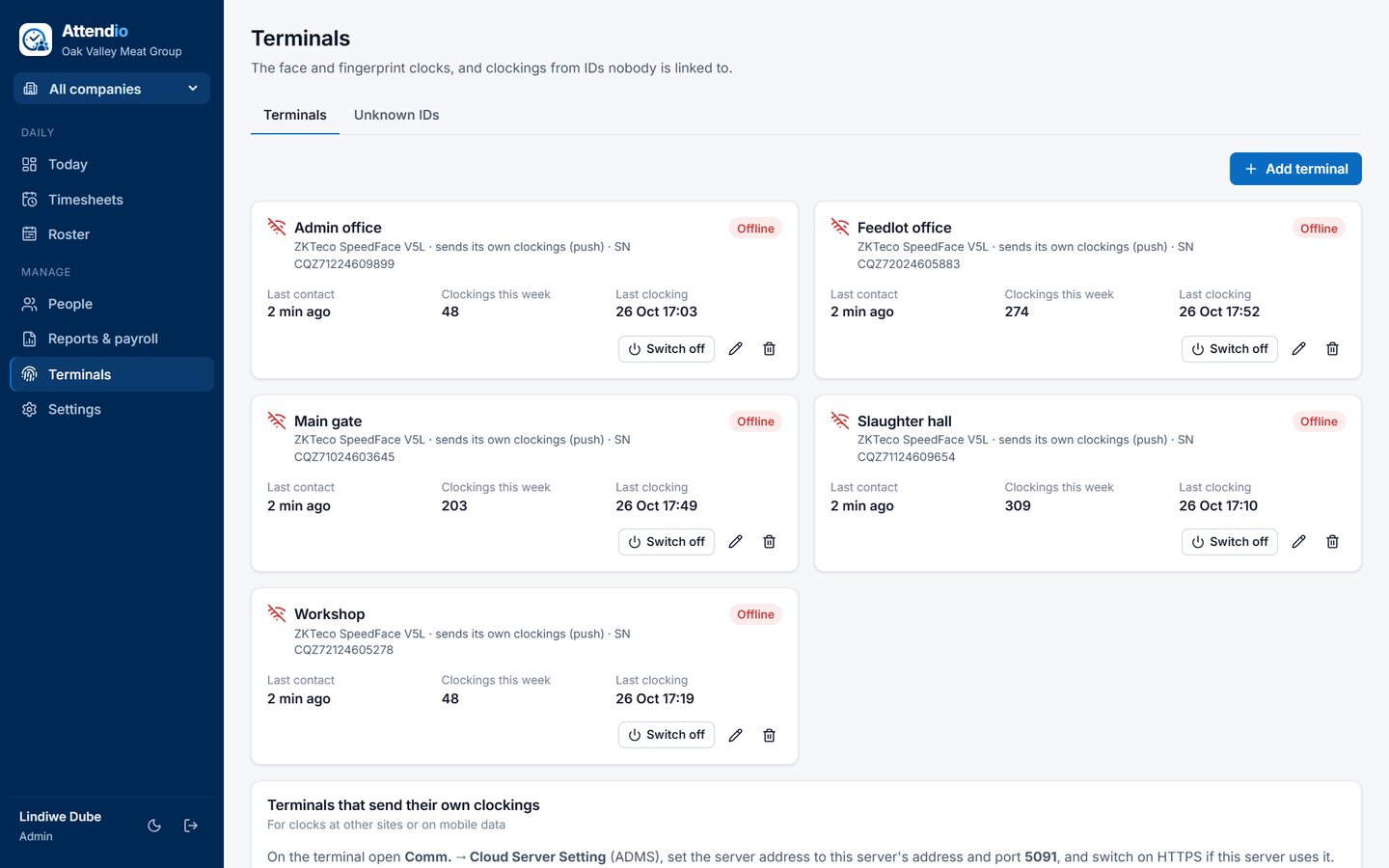
Attendio talks to ZKTeco face and fingerprint terminals directly - the clocks most South African sites already have on the wall.
- On the same network: Attendio downloads every terminal every few minutes, sets their clocks and shows if one goes offline.
- At another site or on mobile data: the terminal sends its clockings to Attendio by itself, over the internet.
- Never lose a clocking: unknown IDs are kept until you link them to the right person.
- Face, fingerprint, card or PIN - shown with every clocking.
Two companies, two HR people, no mix-ups.
Run an abattoir and a farm, or a factory and a depot, from one Attendio. Each user sees only the companies you give them.
- Each company has its own people, departments, terminals, shifts and even its own pay period.
- HR per company: the farm's HR sees the farm only; group HR switches between both or sees them together.
- Shared where it makes sense: public holidays and leave types for everybody.
- Payroll files per company, carrying that company's name.
The file payroll is waiting for.
When the period is checked and signed off, export it. No retyping, no calculator, no arguments about the Sunday rate.
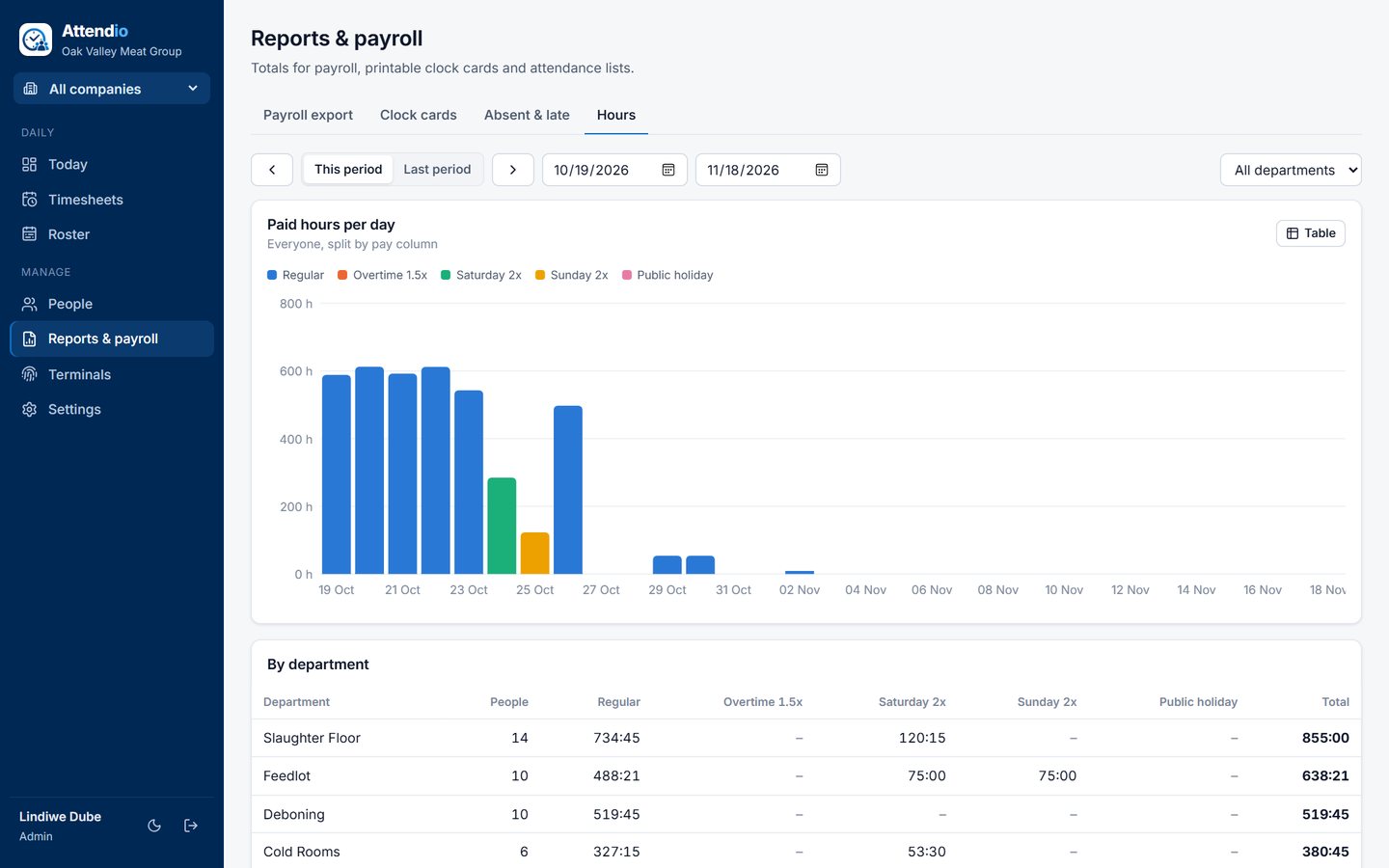
- Regular, overtime 1.5x, Saturday, Sunday and public holiday hours per person - the columns are yours to name.
- The same layout as your old system's export, so your payroll import keeps working on day one.
- Hours per day and per department to see where the overtime goes.
- Printable clock cards when a signature is needed.
The whole system in your pocket.
Attendio runs in the browser, so the floor manager checks who is in from the phone in their pocket and HR fixes a clocking from a tablet. Light or dark, whatever suits.
- No app to install and nothing to update on the PCs
- Dark mode for the night shift
- Your own address, like tna.yourcompany.co.za, with HTTPS
Bring your history with you.
Moving from another time and attendance system? We bring your data across - straight from its database or from its exports, no retyping - and top it up again and again while both run side by side.
Comes across from your current system
- Employees with their terminal IDs, departments and jobs
- Schedules and shifts with their grace, rounding, lunch and overtime rules
- The roster and every clocking, years of history
- Leave, public holidays and the terminals
Most time and attendance systems used in South Africa can be read directly; for the rest we use their exports.
A changeover without risk
- Run both for a pay period and compare the totals person by person
- Terminals switched on when you are ready, one at a time
- Same payroll file layout, so payroll doesn't notice the switch
- Training for HR, payroll and supervisors on your own data
On our servers, or yours.
We can host Attendio for you, or install it on your own Windows or Linux server, with its built-in database or your own Microsoft SQL Server.
Your choice of server
Windows or Linux, in your server room or ours. It uses very little: a small virtual machine runs hundreds of employees.
Your data, backed up
Nightly backups, and your data is always yours to export in full.
Secure
HTTPS, a login per person, locked after repeated wrong passwords, rights per role and every change logged.
Kept up to date
We install updates for you; new features arrive without anyone visiting a PC.
Tell us about your people and sites. We work out the price.
Answer a few questions and see the package that fits: hosted by us for a monthly fee, or on your own server with a once-off licence. The full price list is below.
Simple prices, by the number of employees.
Hosted by us for a monthly fee, or on your own server with a once-off licence. Unlimited users and terminals either way.
Hosted by us
A monthly subscription by number of employees. Standard hosting, backups and updates included.
- Up to 10 employees
- Hosting, backups and updates included
- Unlimited users and terminals
- Support by phone and email
- Up to 25 employees
- Hosting, backups and updates included
- Unlimited users and terminals
- Support by phone and email
- Up to 50 employees
- Hosting, backups and updates included
- Several companies and sites
- Support by phone and email
- Up to 100 employees
- Hosting, backups and updates included
- Several companies and sites
- Priority support
- 100+ employees
- Hosting, backups and updates included
- Several companies and sites
- Priority support
On your own server
A once-off licence; you supply the server. The first year of maintenance is included.
| Package | Licence, once-off | Maintenance from year two |
|---|---|---|
| Starter Up to 10 employees |
R6 000 | R1 200/year |
| Business Up to 25 employees |
R9 500 | R1 900/year |
| Professional Up to 50 employees |
R14 500 | R2 900/year |
| Advanced Up to 100 employees |
R22 500 | R4 500/year |
| Enterprise More than 100 employees |
Quote | Quote |
Once-off setup
We install and configure Attendio with you.
- Basic installation and configuration
Attendio set up with your company, shifts and pay rules.R1 500 once-off - Standard setup with data from your current system
Your people, rosters and clocking history brought across.R2 500 once-off - Advanced setup and multiple devices
Several clocking terminals connected and tested.R4 500 once-off - Enterprise / multi-site installation
Several companies or sites, set up together.from R7 500 once-off
Your own dedicated server
Optional, on top of the cloud subscription.
- Dedicated VM - Basic
Your own virtual server, on top of the subscription.R599/month - Dedicated VM - Standard
More power for bigger sites.R899/month - Dedicated VM - Advanced
For many sites and terminals.R1 499/month - Custom server environment
Built to your requirements.Quote
Additional services
- Remote technical support outside your package
Per hour.R650/hour - On-site technical support
Per hour, plus travel.R850/hour - Additional branch configuration
Another branch or site set up.from R750 once-off - Custom reports and integrations
Reports and links to your other systems.Quote - Biometric clocking devices
Face and fingerprint terminals, supplied and installed.Quote - Data migration
History from an older system brought across.Quote
All prices in rand and excluding VAT.
Live in a week.
We do the setup with you, on your own data.
Talk to us
Tell us about your sites, shifts, clocks and payroll. We show you Attendio on a sample of your own data.
We set it up
Attendio installed or hosted, your history imported, rules and shifts checked against your current payroll.
Connect the clocks
Your terminals linked one at a time, while the old system keeps running.
First payroll
Run a pay period side by side, compare, sign off - and switch.
Good to know.
Which clocking terminals does Attendio work with?
ZKTeco face, fingerprint, card and PIN terminals - including the ones many older systems use. On your network Attendio downloads them; at other sites they send their clockings over the internet. Ask us about other makes.
What if the network or the server goes down?
The terminals keep every clocking in their memory. When the connection is back Attendio downloads them, and duplicates are ignored, so nothing is lost or counted twice.
Can it handle night shifts and rotating rosters?
Yes. A shift that crosses midnight stays one shift on the day it started, and rotations can be copied forward for as long as you like.
How are Sundays, Saturdays and public holidays paid?
You choose per shift which pay column each day goes to, and the rate of each column. South African public holidays are added for you, paid when not worked and at the holiday rate when worked.
Will our payroll still import the file?
Yes. Attendio exports in the layout your payroll already imports from your current system, or as a plain spreadsheet. New layouts are set up for you.
Can supervisors only see their own people?
Yes. Supervisors can be limited to their departments, and every user can be limited to some companies. Payroll and administrators see what you give them.
Does anyone have to install anything?
No. Attendio runs in the browser on PCs, tablets and phones. Only the server needs installing, and we do that - or host it for you.
Is my data mine?
Yes. Export it any time, and if you leave we give you a full copy of the database.
See your own clock-in data in Attendio.
Book a demo and we load a sample of your own clockings, so you see your people, your shifts and your overtime - not a made-up example.